Architecture Overview
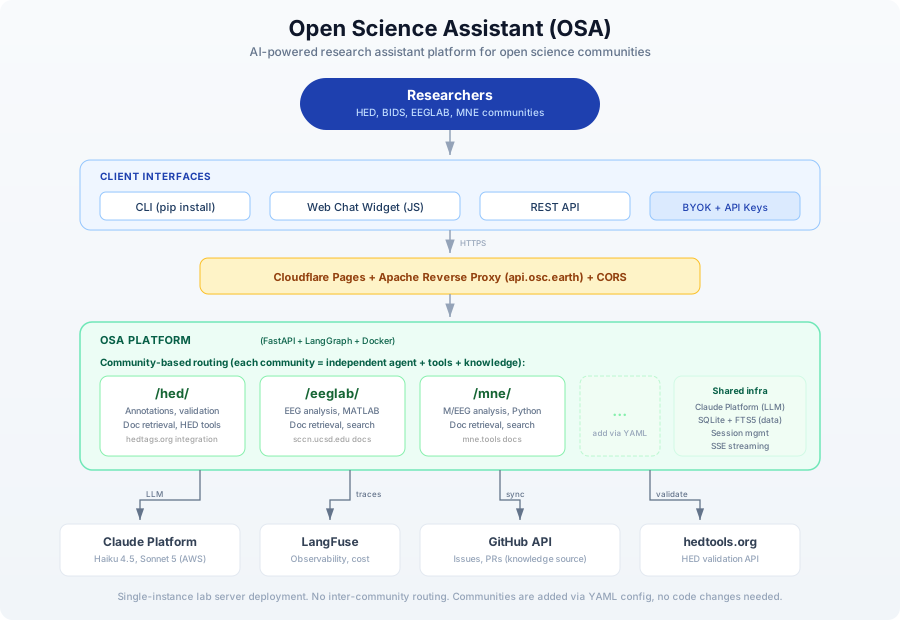
OSA is a single-instance AI assistant platform that serves multiple research communities from one deployment. Each community gets its own independent namespace with a dedicated agent, tools, and knowledge base.
Key Design Decisions
Community-based routing, not a supervisor agent
Each community (HED, EEGLAB, MNE, etc.) is an independent namespace at the API level:
/hed/ask       - Ask the HED assistant
/eeglab/chat   - Chat with the EEGLAB assistant
/mne/ask       - Ask the MNE assistant
There is no router or supervisor agent that dispatches queries between communities. The user (or widget) selects a community explicitly, and each community has its own:
- System prompt tailored to the domain
- Tools configured via YAML extensions
- Knowledge base (SQLite + FTS5, synced from GitHub)
- LangGraph agent running the conversation loop
Simple infrastructure
OSA targets small research communities running on lab servers, not large-scale cloud deployments:
| Choice | Why |
|---|---|
| Single FastAPI instance | No need for horizontal scaling |
| SQLite + FTS5 | No external database server needed; full-text search with BM25 ranking |
| In-memory sessions | Single instance means no shared state needed |
| Docker | Reproducible deployment, easy updates |
| Claude Platform on AWS | One provider and two models rather than a routing layer; native source citations and prompt caching |
Adding a community requires no code changes
Communities are defined entirely in YAML configuration files. Adding a new community means creating a config.yaml with the community's identity, system prompt, tools, and knowledge sources. The API routes are generated dynamically at startup.
See the Community Registry documentation for details.
Component Summary
| Component | Technology | Purpose |
|---|---|---|
| API Server | FastAPI | REST API, SSE streaming |
| CLI | Typer + Rich | Command-line interface (pip install open-science-assistant) |
| Agent Orchestration | LangGraph | State machine for conversation + tool-calling loop |
| LLM Access | langchain-anthropic | Claude Platform on AWS: prompt caching, extended thinking, citations |
| LLM Access (Bedrock) | langchain-aws | Amazon Bedrock: GPT-6 Luna, Qwen3 Next and gpt-oss-120b, on the platform's own key |
| LLM Access (BYOK) | LiteLLM | OpenRouter, only when a caller brings an OpenRouter key |
| Knowledge Storage | SQLite + FTS5 | Issues, PRs, docs with full-text search (BM25) |
| Observability | LangFuse | Tracing, cost tracking, quality metrics |
| Deployment | Docker + GitHub Actions | CI/CD to GHCR, deploy via SSH |
| Frontend | Cloudflare Pages | Widget hosting (demo.osc.earth) |
| Reverse Proxy | Apache | api.osc.earth path-based routing |
External API Integrations
OSA integrates with existing validator and tool APIs rather than hosting validation engines locally:
| Service | Integration |
|---|---|
| HED Validation | String, sidecar, spreadsheet, BIDS validation |
| Claude Platform on AWS | Default LLM provider (Claude Haiku 4.5, Claude Sonnet 5.5) |
| Amazon Bedrock | Three lower-cost non-Claude models (GPT-6 Luna, Qwen3 Next, gpt-oss-120b), when the deployment has a Bedrock key |
| OpenRouter | BYOK-only alternative LLM provider |
| GitHub API | Knowledge source (issues, PRs) |
| LangFuse | Observability and cost tracking |
Authentication
OSA supports two authentication modes:
- Server API key (
X-API-Keyheader): uses the server's own Claude Platform key with the community's default model - BYOK (Bring Your Own Key): the caller supplies a key on
X-Anthropic-API-KeyorX-OpenRouter-Key, and that request is billed to them instead of to the platform
Which header arrives decides which provider serves the request. An Anthropic key takes the Claude Platform path and can use either offered Claude model (the Bedrock models run only on the platform's own key); an OpenRouter key takes the LiteLLM path. BYOK is additive rather than a replacement, so a community that was using OpenRouter before the migration keeps working.
Deployment
OSA runs as a Docker container behind an Apache reverse proxy:
| Environment | API URL | Frontend URL |
|---|---|---|
| Production | https://api.osc.earth/osa | https://demo.osc.earth |
| Development | https://api.osc.earth/osa-dev | https://develop-demo.osc.earth |
CI/CD: GitHub Actions builds Docker images on push, tagged :dev (develop branch) or :latest (main branch). Deployment is a docker pull + restart on the lab server.
For the detailed internal architecture, see Architecture Details.