Architecture Details
This page shows the internal structure of the OSA platform, including all components, data flows, and external service connections.
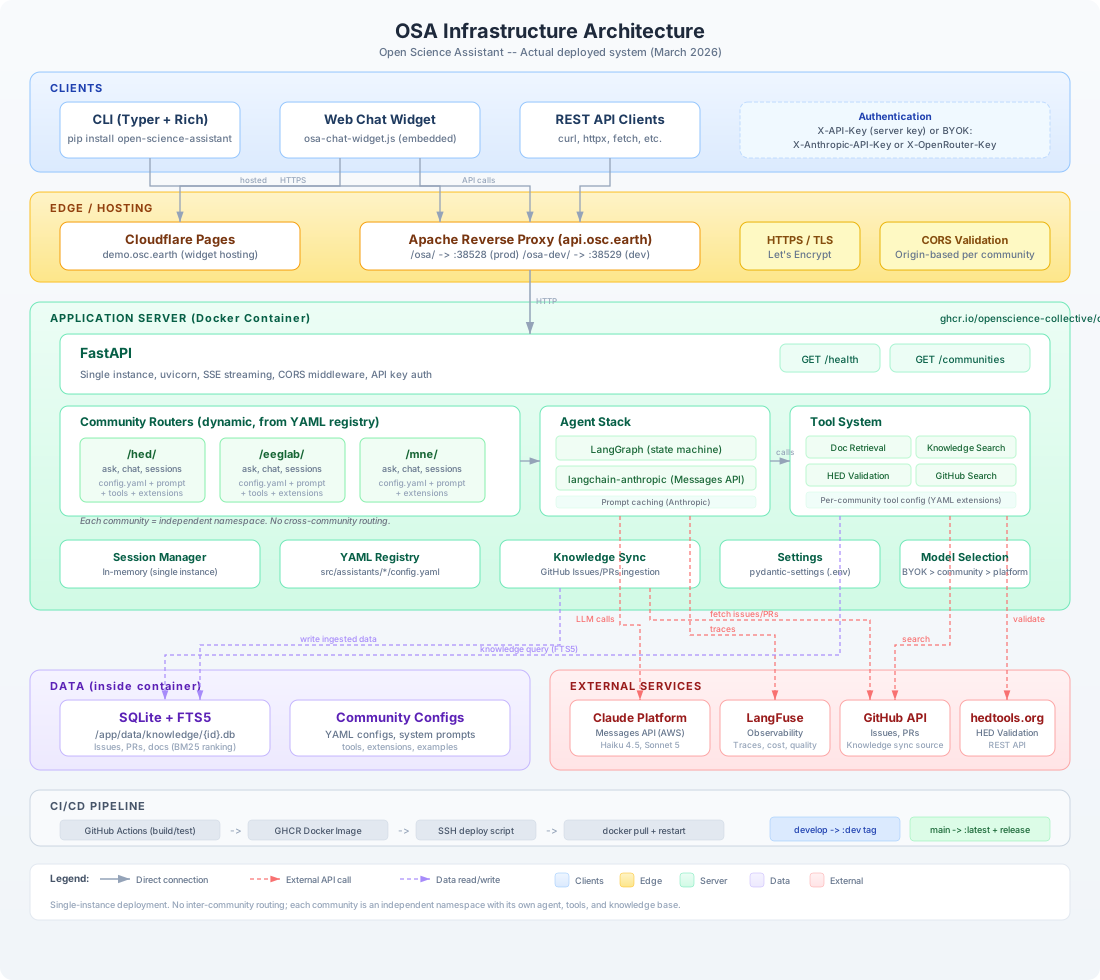
Request Flow
A typical request flows through the system as follows:
- Client (CLI, widget, or API consumer) sends an HTTPS request to
api.osc.earth - Apache reverse proxy strips the
/osa/prefix and forwards to the Docker container - FastAPI validates authentication (API key or BYOK headers) and CORS origin
- Community router (e.g.,
/hed/ask) handles the request using the community's configuration - LangGraph agent runs the conversation loop:
- Sends messages to Claude on the Claude Platform on AWS via
langchain-anthropic, to GPT-6 Luna, Qwen3 Next or gpt-oss-120b on Amazon Bedrock vialangchain-aws, or through LiteLLM to OpenRouter when the caller brought an OpenRouter key - LLM may request tool calls (document retrieval, knowledge search, validation)
- Tools query SQLite + FTS5 databases or external APIs (GitHub, hedtools.org)
- Loop continues until the agent produces a final response
- Sends messages to Claude on the Claude Platform on AWS via
- Response is streamed back to the client via SSE (Server-Sent Events)
- LangFuse records the trace for observability
Community Routing
Routes are created dynamically at startup from the YAML registry:
# src/api/main.py - simplified
for community in registry.list_available():
    router = create_community_router(community.id)
    app.include_router(router)  # Creates /{community_id}/ask, /chat, etc.
Each community gets four endpoints:
| Endpoint | Method | Purpose |
|---|---|---|
/{id}/ | GET | Community configuration (public) |
/{id}/ask | POST | Single question (no history) |
/{id}/chat | POST | Multi-turn conversation with session |
/{id}/sessions | GET | List active sessions |
Model Selection
Model selection follows a priority chain:
Request names a model
    |  an offered model runs (on the Claude Platform, or Amazon Bedrock for the three Bedrock models)
    |  one that is not offered is a 400; on OpenRouter a custom model needs the caller's own key
    v  (no model named)
Community default_model (from config.yaml)
    |
    v  (no community override)
Platform default_model (from settings; claude-haiku-4-5)
This allows communities to choose their preferred model while letting a reader pick any other offered model in the widget.
The reasoning level follows the model that was chosen: the community's reasoning_effort (high when unset), which the chosen model clamps to the levels it accepts.
Knowledge System
Each community has its own SQLite database with FTS5 full-text search:
/app/data/knowledge/
    hed.db       - HED issues, PRs, documentation
    eeglab.db    - EEGLAB issues, PRs, documentation
    mne.db       - MNE issues, PRs, documentation
Knowledge is synced from GitHub via the osa sync CLI command, which fetches issues and PRs and indexes them for full-text search with BM25 ranking.
Why SQLite + FTS5?
For single-instance lab deployment, SQLite with FTS5 is the optimal choice:
| Approach | Search Speed | Dependencies | Use Case |
|---|---|---|---|
| JSON files | O(n) linear | None | Tiny datasets (<1K) |
| SQLite + FTS5 | O(log n) indexed | None (stdlib) | Single instance, 10K-1M records |
| PostgreSQL | O(log n) indexed | External server | Multi-instance |
Advantages: no external server, BM25 ranking, 100-1000x faster than linear scan, Python stdlib, easy backup (copy the file).
Security Layers
| Layer | Protects Against | Location |
|---|---|---|
| HTTPS / TLS | Man-in-the-middle | Let's Encrypt via Apache |
| API Key auth | Unauthorized access | FastAPI middleware |
| CORS validation | Cross-origin attacks | FastAPI middleware (per-community origins) |
| BYOK isolation | Key exposure | Keys forwarded, never stored |
CI/CD Pipeline
GitHub Actions (build/test)
    -> GHCR Docker Image (:dev or :latest)
    -> SSH deploy script
    -> docker pull + restart on lab server
| Branch | Docker Tag | Deployment |
|---|---|---|
develop | :dev | api.osc.earth/osa-dev (port 38529) |
main | :latest + GitHub Release | api.osc.earth/osa (port 38528) |